
Home › Blog › AI Powered Quality Control
AI & Design
Building SkyBook AI Powered Quality Control: How We Used AI to Catch Design Mistakes Before the Client Does
The story behind an AI powered quality control app that checks creative work against the client’s brief and brand guidelines, and what building it taught me about turning an idea into a real product.
Published 19 November 2026 · 8 min read

In this article
At a glance
- Seven checking areas, run the same way every time
- Three outcomes: PASS, NEEDS REVISION or FAIL
- Briefs accepted in PDF, Word, Excel, text and image formats
- Results automatically deleted after 24 hours
Interested in AI powered apps that solve real business problems?
Visit skybookdigital.com or call / WhatsApp +91 90723 24466.
Every design team knows the feeling.
The artwork is finished. It looks great. It’s been through two rounds of internal feedback and it’s ready to send. Then, ten minutes after it lands in the client’s inbox, a reply comes back: “The logo is the old version.” Or “The offer date is wrong.” Or simply, “This isn’t the shade of blue in our guidelines.”
None of these are hard problems. They’re small details. But small details are exactly what slip through when a team is juggling dozens of briefs, brand books and deadlines at the same time.
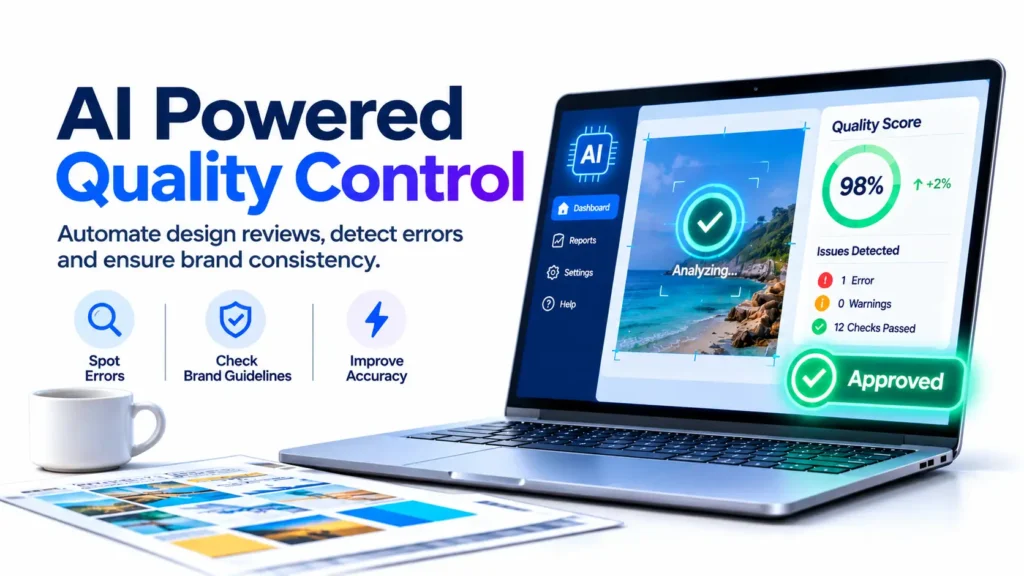
That frustration was the starting point for one of my recent projects: SkyBook AI Powered Quality Control, an AI powered quality control application that helps design teams check creative work against the client brief and brand guidelines before it goes out the door.

The problem: quality control that depends on tired eyes
In most creative teams, quality checking is manual. A design team, team lead or account manager opens the brief in one window, the brand guidelines in another and the design in a third, then compares them line by line, usually working from a design quality control checklist that lives in a spreadsheet or in someone’s head.
Brief
Brand guidelines
Design
Three windows. One tired reviewer.
Manual checking means comparing the brief, the brand guidelines and the design line by line.
It works, but it has some obvious weak spots:
It’s slow.
Careful checking takes time that busy teams rarely have.
It’s inconsistent.
Two reviewers can check the same file and notice different things.
It relies on memory.
Every client has their own rules, and nobody can hold all of them in their head.
It’s easy to skip.
When a deadline is close, the final quality control check is the first thing that gets rushed.
And when checks get rushed, brand consistency and overall design quality are usually the first things to suffer: a slightly different shade here, an old logo there, until the client’s brand starts to look different from one piece to the next.
I wanted to see whether AI could take on the repetitive part of that work, improving the quality control process and giving teams better control over design standards, so people could spend their attention on the judgement calls that really need a human.
What SkyBook AI Powered Quality Control does: AI design feedback before delivery
In simple terms, the app acts like a careful second reviewer that gives AI design feedback before anything reaches the client. You upload the design and the client’s brief; the brand guidelines are already saved in that company’s profile. The app then performs quality control checks on the work against both the client brief and brand guidelines.
Here are the main features:
AI-powered design analysis
Google Gemini analyses uploaded designs, including text, layout and visual elements. Rule-based checks compare the findings against the brief and brand requirements to generate a consistent, explainable score.
Brief reading and verification
The app accepts briefs in PDF, Word, Excel, text and image formats, or manual input. It checks designs against the brief and flags missing elements or incorrect details, such as offer dates.
Brand Guideline and “Golden Rules” Validation
Brand guidelines, covering elements such as logos, colours and typography, are saved once in each company’s profile, so they don’t need to be uploaded every time a design is checked. The app uses AI-powered design analysis and automated quality control to check whether the logo is present and matches the approved version. Written logo-usage rules, such as clear-space and placement instructions, are flagged for a person to review, ensuring better control over brand standards.
On top of that, the app supports Golden Rules: the non-negotiable standards a team wants applied to every piece of work.
Seven AI Powered Quality Control checking areas
Every design is checked across seven areas, which together work like a design quality control checklist that runs the same way every time:
The same seven checks, every time
Brief
Whether the design includes what the brief asked for, with the right details, such as offer dates
Content
The text on the design and the information it needs to carry
Brand
The company’s saved brand guidelines, including logo presence and match
Design
Layout and visual elements, such as text positioned too close to the edge
Golden Rules
The team’s own non-negotiable standards for every job
Legal
Compliance points, including mandatory disclaimers
Accessibility
Whether the work is easy for more people to read and use
Every design runs through the same seven areas.
The legal check deserves a special mention. Together with the Brand and Golden Rules areas, it turns each review into a proper brand compliance check.
Clear outcomes: PASS, NEEDS REVISION or FAIL
PASS
NEEDS REVISION
FAIL
Each review ends with one of three outcomes, PASS, NEEDS REVISION or FAIL, along with a quality score. Issues are listed by severity, each with a suggested fix, so the design team knows what to tackle first. In my experience, AI powered design feedback is only valuable when it’s this specific: “the offer date doesn’t match the brief” or “this text sits too close to the edge” helps, while “the layout could be improved” doesn’t.
Human verification for uncertain findings
AI isn’t always certain, and the app doesn’t pretend otherwise. When a finding is uncertain, it’s flagged for human review rather than automatically counted as a failure. This AI-powered quality control approach keeps the review process fair, maintains accuracy and ensures people remain in control of the final decision.
Downloadable PDF reports
Every check can be exported as a PDF Quality Control report. That’s useful for keeping a record, sharing findings with the team, or showing that a piece of work went through a proper review before delivery.
Privacy built in
Design and Quality Control results are temporary. They’re automatically deleted after 24 hours, and the app doesn’t keep a history of previous checks, so the PDF report is the record to save. For teams handling unreleased client artwork, that matters.
Company Profile and secure sign-in
Each company has its own profile holding its brand guidelines, so the right rules are applied every time and brand compliance doesn’t depend on who happens to be reviewing. Access is protected by the application’s own authentication, so only the right people can get in.
The aim was never to replace the designer’s eye. It was to give every piece of work a consistent first check, so people can focus on what really needs a human decision.
How it’s built
For anyone curious about what’s under the hood, here’s the stack:

Frontend
Next.js, React, TypeScript, Tailwind CSS
Backend
Server-side development and API integration
AI
Google Gemini API for design analysis, LLM integration, generative AI and prompt engineering, with Claude Code used during development
QC logic
Rule-based checks that compare findings against the brief and brand requirements and calculate the score
Database and storage
PostgreSQL database and private file storage via Supabase
Security
The application’s own authentication and secure API key management
Deployment
Render, for production hosting
Secure API key management was a must. When an app talks to an AI model, the keys that unlock that model need to stay on the server and out of the browser. Getting this right is one of those unglamorous jobs that makes the difference between a demo and a production application.
The hardest part: making AI useful, not just impressive
Connecting an AI model is easy. Getting consistently useful results requires careful prompt engineering. The model needs clear instructions on what to check and how to structure its output so rule-based checks can generate a scored, itemised report.
AI findings also need human review. Uncertain results are flagged for review rather than counted as failures, keeping the final decision in the team’s hands.
Clear prompt
AI model
Rule-based checks
Scored report
Uncertain results go to a human, not straight to a fail
Careful prompt engineering structures the AI output so the rule-based checks can score it.
Using AI to build an AI product
AI tools like Claude, ChatGPT and Google Gemini supported development through debugging, problem-solving and coding. They helped speed up the process without replacing the need to understand the code.
What I learned
This project gave me practical experience in:
- Full-stack development across frontend, backend and database
- LLM integration and Prompt Engineering
- Third-party API integration
- PostgreSQL and Supabase
- Authentication and API security
- Production deployment
SkyBook AI Powered Quality Control works as an idea because it comes from a frustration every design team recognises. The technology matters, but it’s the problem that gives it a purpose.

What’s next
Building an AI-powered quality control application has been a rewarding experience. I’m excited to explore more ways AI can simplify everyday work.
If you work in a creative or marketing team, I’d love to hear how you manage quality checks and what challenges you face.
Interested in AI powered apps that solve real business problems?
SkyBook Digital works at the meeting point of design, digital marketing and technology. If you’d like to talk about how smarter workflows could support your brand, get in touch.
Visit skybookdigital.com or call / WhatsApp +91 90723 24466.